Google has spent the last two years teaching Gemini to answer questions faster. With Gemini Spark, it’s trying something different: an AI that doesn’t wait for you to ask.
Announced at Google I/O in May 2026, Gemini Spark is Google’s always-on personal AI agent. Instead of the usual prompt-and-response routine, Spark runs continuously in the background, checking your inbox, watching your calendar, and completing multi-step tasks across your Google apps without you having to sit and supervise it. You do not need to keep your laptop open for it to keep working, because it runs on dedicated virtual machines in Google’s cloud, not on your device.
If you’ve used ChatGPT’s agent mode or Anthropic’s Claude Cowork, the concept will feel familiar. Spark is built directly into the apps hundreds of millions of people already use every day — Gmail, Google Drive, Calendar, Docs, Sheets, Slides, YouTube, and Google Maps — which gives it a shortcut most competing agents don’t have.
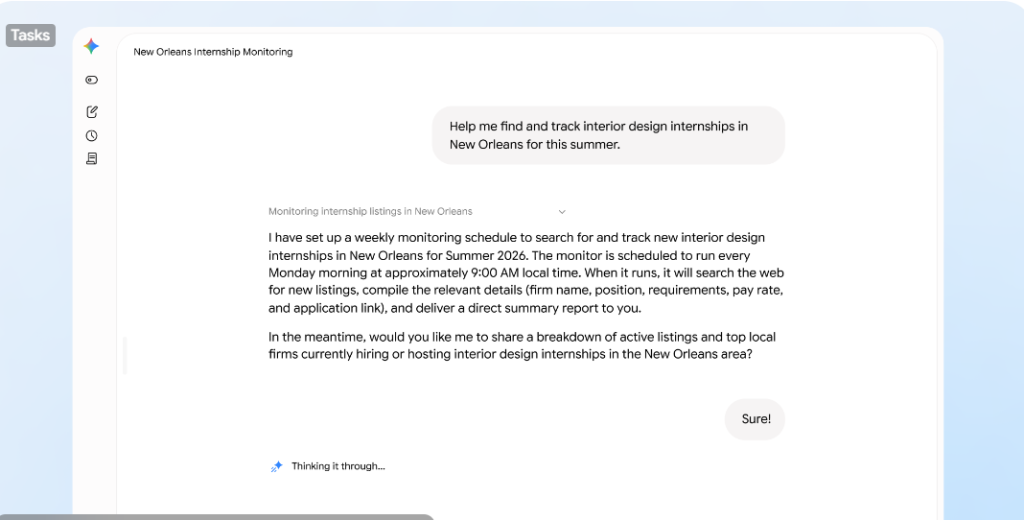
How Gemini Spark works
Spark runs on Gemini 3.5 Flash, paired with Google’s Antigravity agentic framework, which lets it plan and execute multi-step tasks rather than just answering a single prompt. Because it lives on Google’s servers, it keeps working even after you have closed your laptop or locked your phone
Three features work together to define what Spark can do:
- Tasks: one-off or ongoing jobs you assign, like organising a Drive folder or drafting a status update.
- Skills: reusable instructions you teach Spark for things you do often, so you’re not re-explaining yourself every time.
- Schedules: time-based or condition-based triggers that fire tasks automatically, like the first of every month or the moment an email arrives.
None of Spark’s app connections are switched on by default. You choose which services it can see, and Google says it is designed to check in with you before taking high-stakes actions, including spending money or sending an email on your behalf, for instance.
What Gemini Spark can do for you
Spark is aimed at repetitive tasks that eat up time. This includes:
- Inbox triage — scanning your email, drafting replies, and flagging what actually needs your attention instead of leaving you to wade through everything yourself.
- Document and report generation — pulling information from Gmail, Docs, Sheets, and Slides to write a status update or summary from scratch.
- Recurring admin — parsing a monthly credit card statement to flag hidden subscription charges, or generating and emailing an invoice from your logged hours on the first of the month.
- Lead and client tracking — for small business owners, watching an inbox for service inquiries, logging details in a spreadsheet, and creating a client folder automatically.
- Research and synthesis — pulling together raw meeting notes scattered across emails and chats into a polished document, then drafting the follow-up email.
Google is also opening Spark up to third-party apps through Model Context Protocol (MCP) connections, which are open-source standards for connecting AI applications to external systems. With MCPs, Canva, OpenTable, and Instacart have been connected to Spark, with more integrations rolling out over time.
Availability
Gemini Spark rolled out first to testers, then as a beta for Google AI Ultra subscribers in the United States, alongside select business users.
At the end of June 2026, Google brought Spark to the Gemini app for macOS, giving the agent access to a user’s local files for the first time — sorting a Downloads folder, or building a budget spreadsheet from invoices saved on the computer, for instance. Users control access folder by folder, and Google says a future update will let people kick off a task on their Mac remotely, from their phone.
Alongside the desktop launch, Spark also picked up support for custom MCP connections, letting users wire in their own apps, plus real-time topic tracking for things like sports scores, stock movements, and breaking news. New integrations with Google Tasks, Google Keep, Canva, Dropbox, Instacart, OpenTable, and Zillow Rentals arrived at the same time — Keep and Tasks support, in particular, addressed one of the more common complaints from early testers. Those third-party app integrations rolled out to web and mobile first, with the macOS app catching up in the following weeks.
There’s no confirmed timeline yet for wider international rollout, so most users outside the US, including across Africa, don’t have access at the time of writing.
Should you care yet?
Spark is worth watching for what it signals: Google is betting that the next phase of AI is about getting an agent to reliably do your admin for you — inbox, calendar, documents, and all.
For anyone running a small business, managing client communication, or just drowning in email, that’s the feature to keep an eye on as access widens.
True scale demands moving beyond surface-level integrations to robust execution. We’ve filtered the noise out of Moonshot 2026, optimising the conference strictly for high-calibre connections between startup founders, global financial operators, enterprise leaders and individuals rewiring Africa’s technical frameworks.
Get 20% off Early Bird tickets for a limited time.
